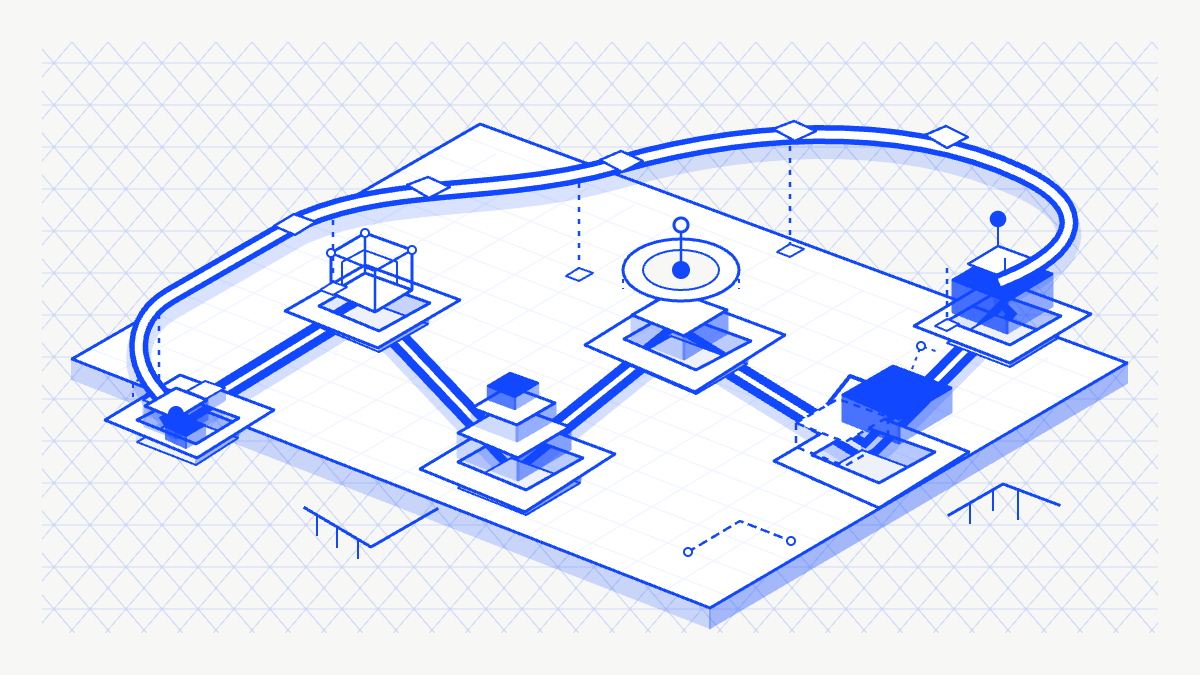
A company changelog is a shared, chronological record of material changes to AI workflows. Each entry explains what changed, why it matters, who owns it, which teams and systems it affects, where human review happens, and where the supporting instructions live. The format gives employees a current view of the rollout and gives connected AI tools structured context they can retrieve later.
Most AI rollouts become hard to follow before anything visibly breaks.
The pattern has repeated across several companies I work with. AI workflow implementation lands on a small team, or sometimes one person. They map the process, configure permissions, test edge cases, review outputs, and fix failures. That work absorbs the available attention.
Everyone else encounters the results in fragments: a database looks different on Monday, a request comes back faster, or a summary appears in a channel without an explanation of who asked for it or what it uses. The builder can see the system. The people affected by it can only see isolated outputs.
That visibility gap slows adoption because the team lacks a clear operating record.
Why do AI workflow rollouts become invisible?
AI workflows change how work moves through a company. A new agent may read meeting notes, create tasks, update customer records, draft messages, or send information into another system. Each change introduces questions about ownership, permissions, review, and what employees should do differently.
The person building the workflow usually holds those answers in working notes, configuration screens, and recent conversations. Rollout communication becomes another item in the backlog, so the wider team learns about the system through whatever output reaches them first.
Research points to the cost of that gap. Deloitte's 2026 Global Human Capital Trends found that one-third of workers experienced 15 major changes in the previous year, while 27% believed their organization managed change effectively. Gallup's 2026 engagement data found a 15-point engagement difference between employees whose organizations provided a clear plan for integrating AI and those whose organizations did not. Active manager support corresponded with 48% engagement, compared with 30% among employees who reported less support.
The practical implication is straightforward: communication belongs inside AI deployment. People need to understand the purpose, scope, owner, and review path while the workflow is changing their work.
What is a company changelog?
Software teams use changelogs to keep a curated record of notable changes. The record saves people from reverse-engineering commit history or piecing together separate release conversations. A company changelog applies the same principle to operational change.
For AI workflows, each entry covers a material change such as:
- a new agent, skill, or automated workflow
- a material update to an existing workflow
- a new system connection or permission
- a new automated write to company data
- a changed human approval or escalation point
- a retired workflow or replaced process
- an SOP revision that changes how a team works
This employee-facing record serves a different purpose from technical telemetry. An activity log can show that an agent called a tool, received a result, and wrote a record. A company changelog explains why the automation exists, what it can affect, who reviews the output, and what someone should do when the result is wrong.
How does a company changelog help AI workflows stick?
The changelog makes the rollout legible while the work is still changing. Employees can see what has shipped, what remains in review, which workflows have been rolled back, and who owns each decision. Questions attach to a specific change, so feedback reaches the person responsible with the relevant context intact.
The record also helps leaders evaluate the portfolio of AI work. Grouping entries by department, owner, system, or status reveals duplicate initiatives and unowned workflows. Recording the intended result at launch creates a place to add observed evidence after the team has used the system.
This approach fits alongside governance tools. Microsoft Agent 365 provides administrators with a centralized view of agents, activity, adoption, and health. The company changelog translates that technical inventory into operating language for the employees whose work changes.
Teams already build parts of this pattern. Will Larson's account of AI adoption at Imprint describes a company-readable Notion database for agent prompts, a broad AI tips database, and a dedicated #ai-logs Slack channel. The company changelog gives those pieces a consistent entry structure and a defined review loop.
What should every AI workflow changelog entry include?
Keep the entry short enough to scan. It should answer the operating questions someone needs before trusting or using the workflow:
- What changed?
- Why does it matter?
- Who is affected?
- What can the workflow read, create, update, or send?
- Where does human review happen?
- Who owns the next decision?
- Which instructions or SOPs explain the workflow in depth?
The database properties should support filtering and accountability. I would start with author, date, owner, affected team, category, status, related knowledge page, expected impact, observed effect, and Supersedes.
Author and owner should remain separate because the person who documents a change may not maintain it. Team works better as a relation than a text field, which lets people filter the feed to changes that touch their work. Status should include shipped, in review, rolled back, and retired. A record that includes rollbacks earns more trust than a feed that reads like release marketing.
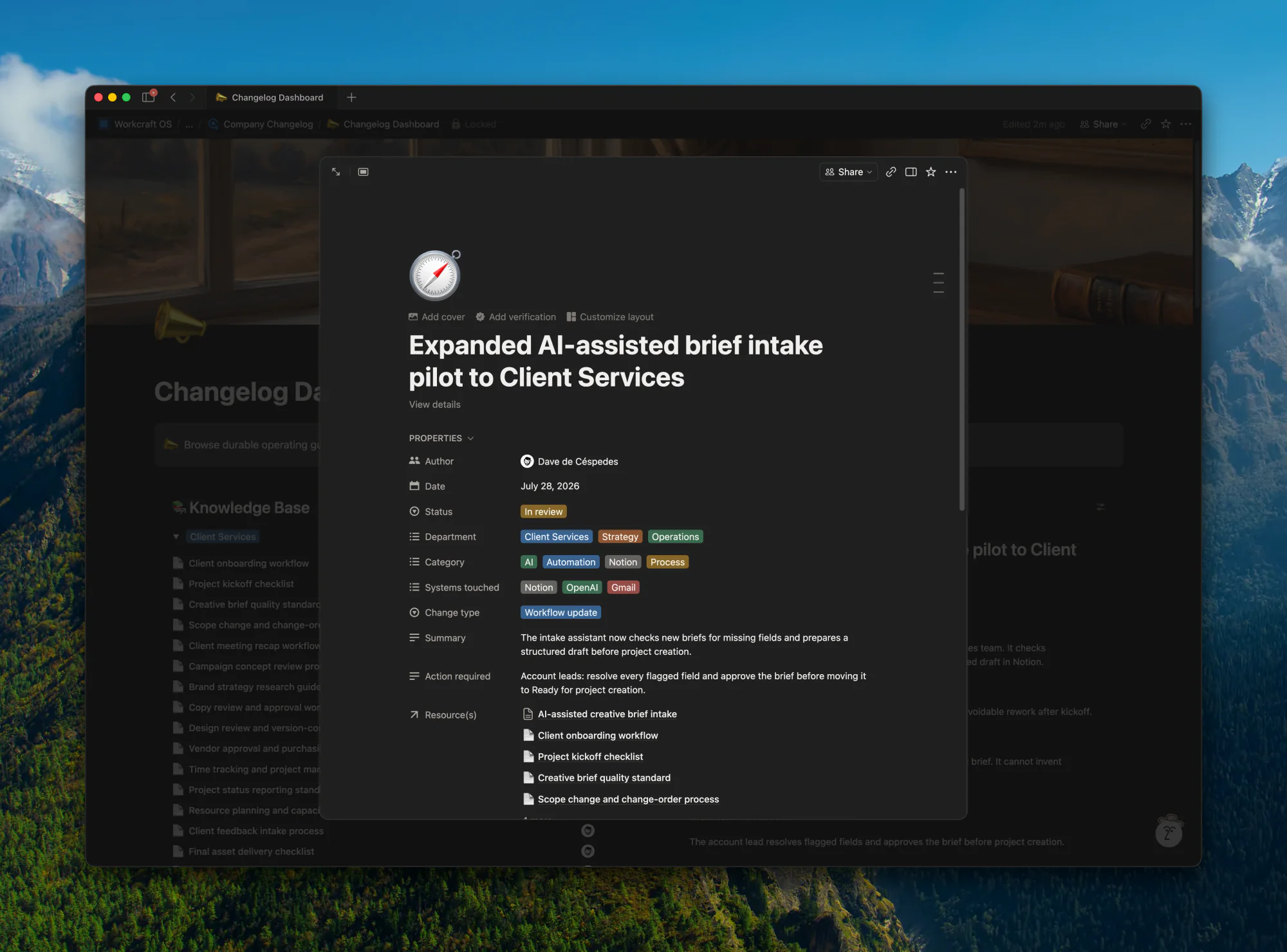
Supersedes preserves material corrections. When a change reverses or materially updates an earlier decision, create a new entry and relate it to the previous one. The sequence stays understandable without silently rewriting history.
How should the changelog and knowledge base work together?
The most practical setup uses two connected databases in Notion.
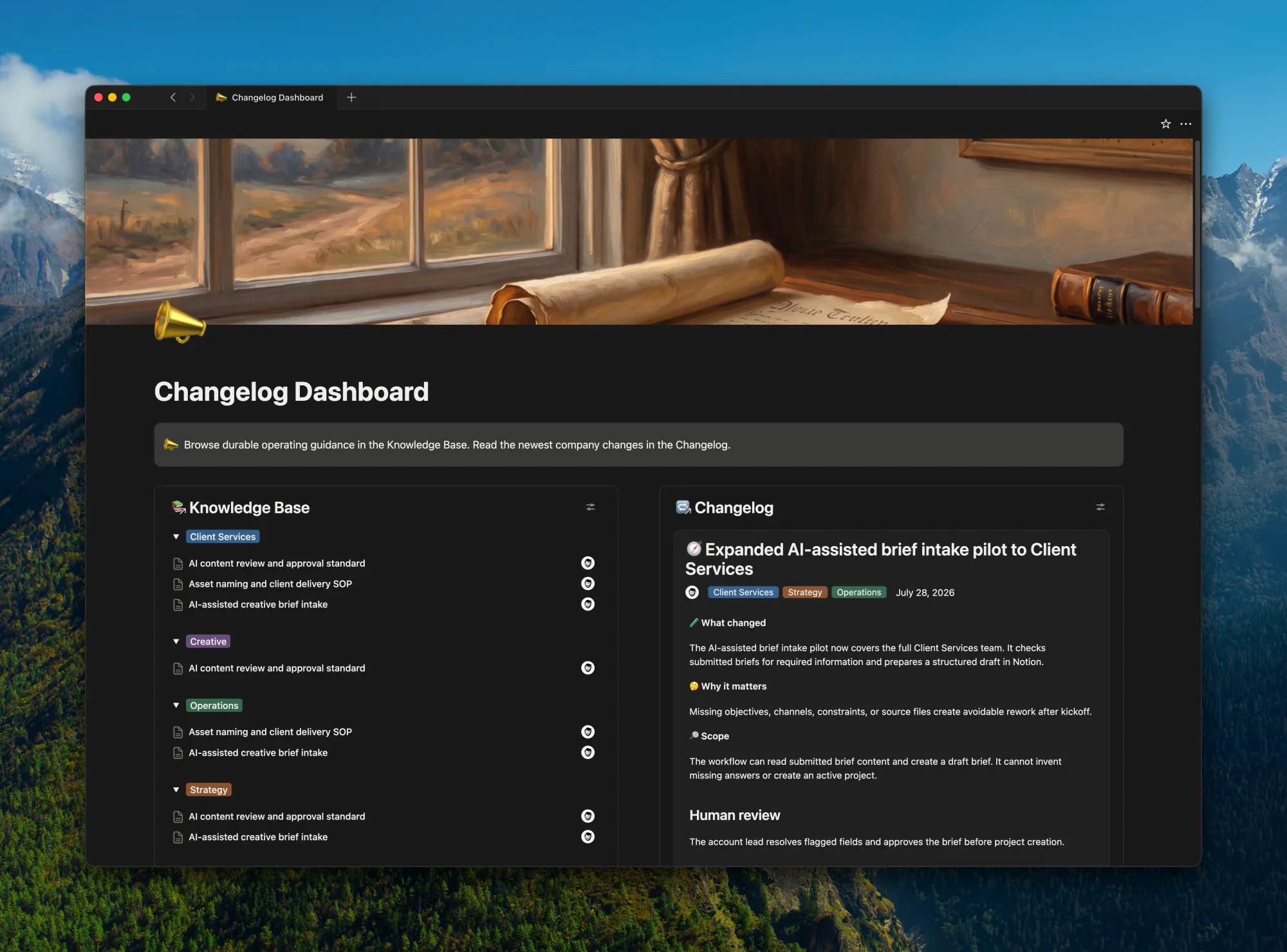
The changelog database
Use Notion's Feed view as the default view, with one card for each material change. A feed feels familiar, supports comments and reactions, and lets employees follow the rollout in sequence. Each card holds the short announcement, operating questions, owner, affected team, status, and links to deeper guidance.
The changelog is the collaboration surface. Employees can ask a question on the relevant entry, flag an edge case, or identify another workflow that touches the same system. Important decisions from those conversations should be copied into the entry or its related knowledge page so the current answer remains easy to find.
The knowledge base database
Use the related knowledge page for details that need SOP-level depth: purpose and trigger, inputs and outputs, systems and permissions, human review, exceptions, escalation, owner, maintenance cadence, and change history.
The relation keeps each announcement connected to the instructions it created or changed.
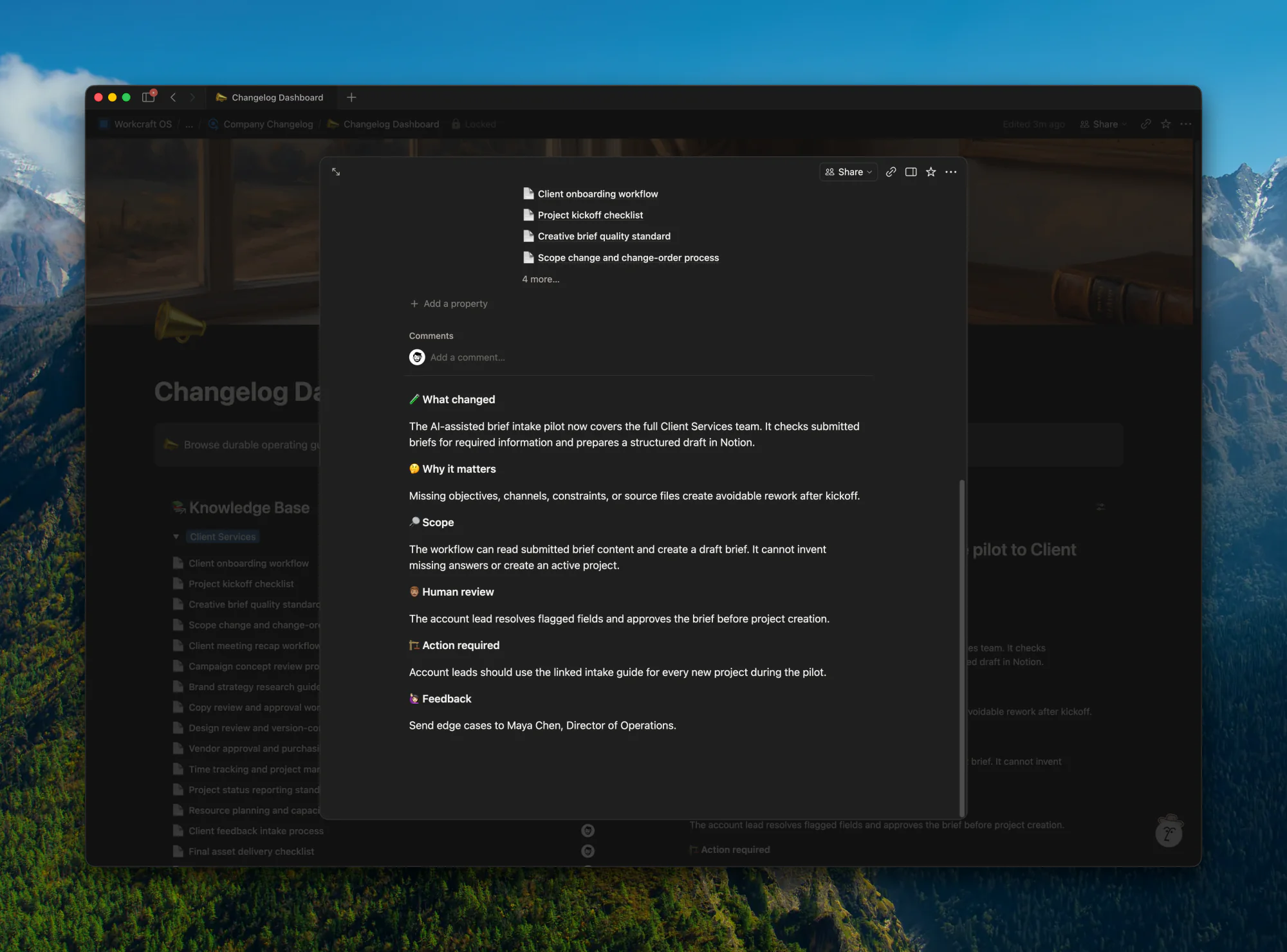
It also supports a stronger context layer for connected AI tools. Notion Enterprise Search can inspect database views, relations, and properties, so a structured changelog and knowledge base can support questions such as:
- Which AI workflows are active in Operations?
- Which agents can update customer information?
- Which workflows still require human approval?
- What changed in the workspace this month?
- Which SOPs were affected by the latest agent rollout?
Answers stay useful when the underlying records stay current. The database structure creates retrieval paths, while the review process creates reliability. This follows the same context principle behind the Rebar framework for decision-ready AI workflows.
How do you keep the record useful and governed?
Changelog entries can remain interactive. Knowledge pages should move through a draft, review, and published state, with editing permissions that match the sensitivity of the workflow.
Notion's page lock reduces accidental edits, although an editor can unlock the page. Comments support discussion, and their authors can edit or delete them. Permissions, review states, page history, and the Supersedes convention carry the governance load.
This separation gives each space a clear job. Changelog comments hold the conversation. Published knowledge pages hold the current operating instructions. Teams that need a broader permission model can connect this setup to a Notion data-governance framework.
What should agents automate?
Agents can reduce the documentation burden once the manual process is working. A useful recurring workflow looks like this:
- A material agent, skill, permission, or workflow change occurs.
- An agent drafts an entry with the affected team, systems, owner, review boundary, and related documentation.
- A human reviews the entry for accuracy, permissions, and sensitive details.
- The approved entry appears in the feed.
- The agent drafts or updates the related knowledge page when operating instructions changed.
- A material correction creates a new entry that supersedes the earlier record.
The agent can collect facts and prepare the first pass. A human should approve the meaning and the company-facing explanation. This is the same boundary I recommend when teams roll out Notion Custom Agents: automate the repeatable work while keeping consequential decisions visible and owned.
How should you measure the impact?
A list of deployed agents does not prove business value. Separate the intended result from what the team observes after use.
Expected impact records the outcome at launch. A workflow may aim to reduce duplicate handoffs, shorten turnaround time, lower error volume, clarify ownership, or improve margin.
Observed effect records evidence after the workflow has been used. Keep the field blank until there is something defensible to enter. The gap between expectation and evidence helps the team decide what to expand, revise, or retire.
Over time, the changelog becomes a portfolio review surface. Leaders can group entries by team, owner, status, or system and see where AI work produces an outcome, where adoption has stalled, and where several teams are solving the same problem separately.
How can a team start this week?
Start with the smallest version employees will read:
- Create a changelog database and use Feed as the default view.
- Assign one owner for the record.
- Add the five AI workflows already affecting company work.
- Capture the owner, affected team, systems touched, review point, and expected impact for each one.
- Link a knowledge page where the operating instructions need depth.
- Set a weekly human review for new entries and stale records.
- Add automatic drafting after the manual habit proves useful.
The first test is simple: can someone outside the implementation team explain what changed last week, why it matters, and who owns the next decision? If the answer requires several Slack searches and a meeting, the company needs a clearer record.
Frequently asked questions
Is a company changelog the same as an audit log?
No. An audit log records system activity for technical, security, or compliance purposes. A company changelog explains material operating changes in language employees can use. Governance-heavy teams may need both, with the changelog linking to the relevant technical record when appropriate.
Does every AI workflow update need a changelog entry?
No. Record changes that affect ownership, permissions, systems, human review, team behavior, or operating instructions. Small configuration tweaks can remain in technical logs unless they change what employees should expect.
Can an AI agent maintain the changelog automatically?
An agent can detect changes, collect facts, and draft entries. A human should review the explanation, permissions, sensitive details, and publication state before the entry becomes company-facing.
Can this work outside Notion?
Yes. The operating model matters more than the tool. Teams need a chronological feed, clear ownership, structured fields, related instructions, review states, and a correction method that preserves earlier entries.
If your team is rolling out AI workflows across departments and nobody can explain what changed last week, start with the record. Workcraft helps teams map the workflow, define ownership and review, and build the operating layer around it.