Watch the walkthrough on YouTube
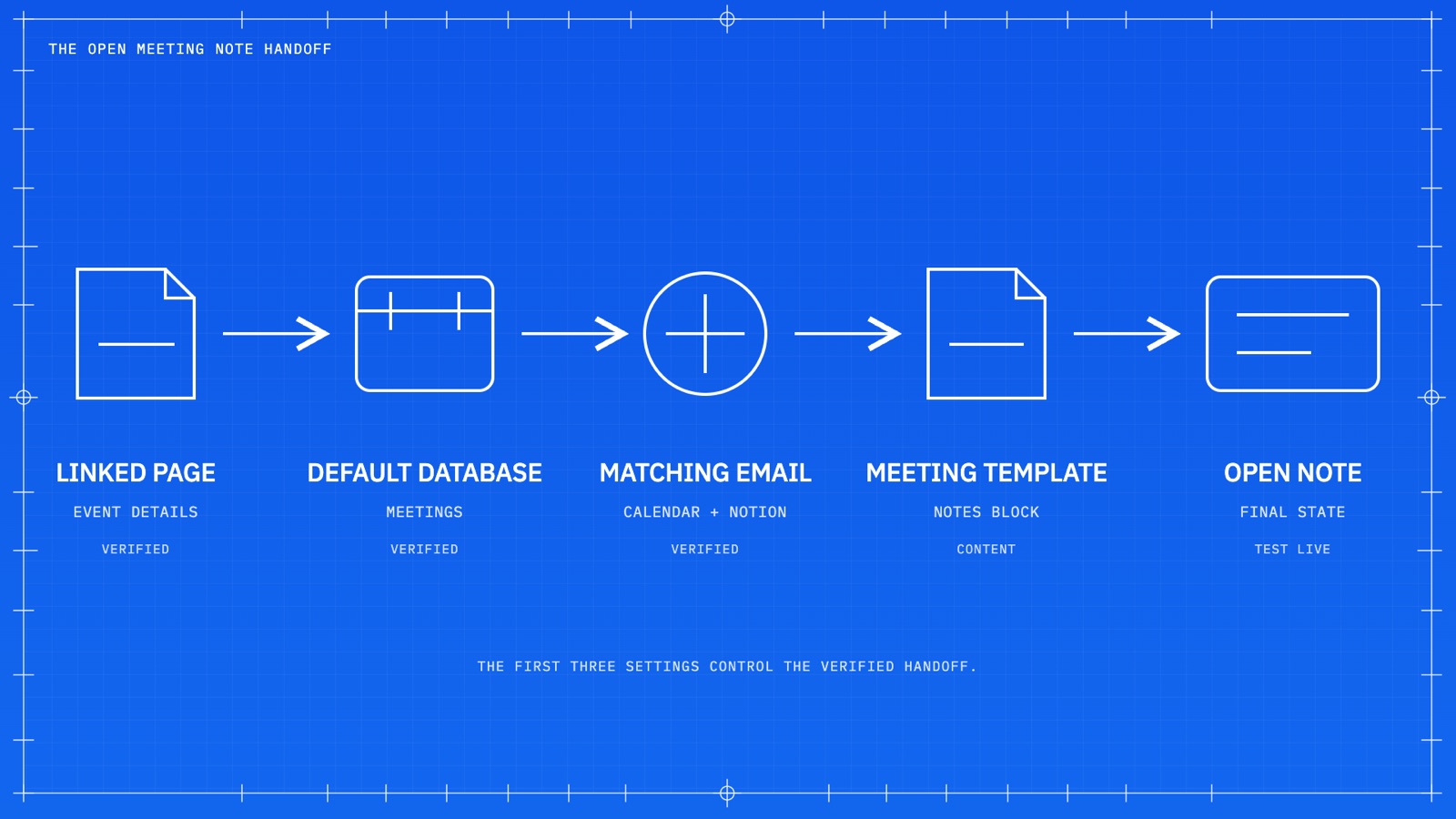
Notion Calendar now opens an existing Notion meeting page instead of creating a duplicate. Four things have to be true: the meeting page is linked in the calendar event, your default meetings database is set in Notion Calendar, your Notion Calendar and Notion profile emails match, and the page carries an AI meeting notes block. A Custom Agent handles everything else.
If you've ever built a calendar-to-Notion sync and ended up with two meeting pages for the same call, this one's for you. One page had all the details your automation pulled in. The other had your actual meeting notes. Neither had both.
That bug drove me crazy for the better part of a year. It came up with basically every client where we set up a meetings database. I posted about it on X, the Notion Calendar team replied, and the fix shipped about a day later.
So here's the full workflow: what changed, the exact conditions that make it work, and the agent that keeps a meetings database honest.
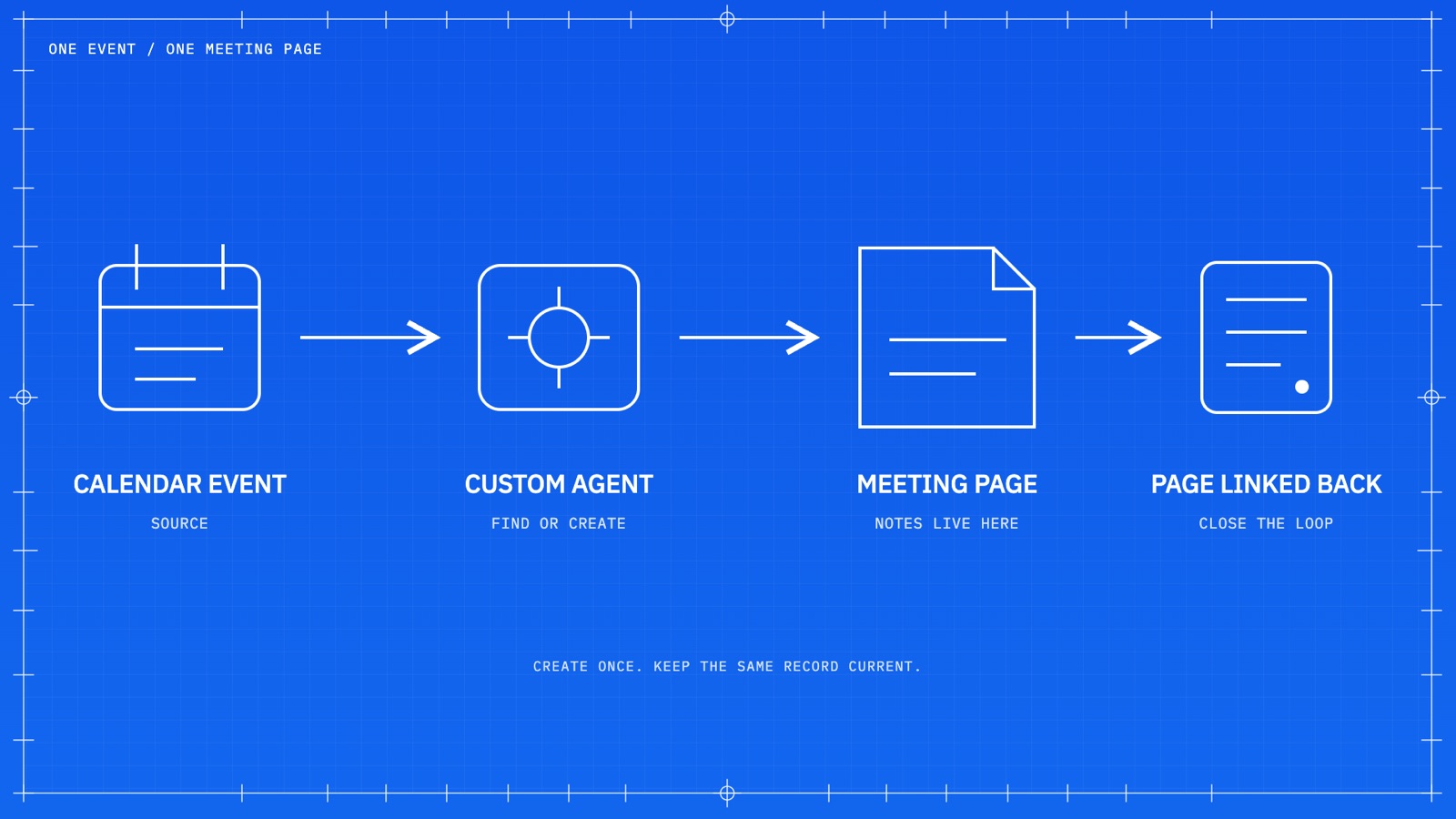
The duplicate meeting note problem
Say you have a Custom Agent, or a Claude Code or Codex skill, syncing your calendar to a meetings database. A new meeting gets scheduled, the agent creates a Notion page, pulls in the event description, and drops a link to that page back into the calendar event. Clean.
Then you open Notion Calendar, click Join and transcribe, and it ignores the link sitting right there and creates a brand-new meeting notes page.
Now you've got two pages for one meeting. Your AI transcript lands on the new one. Your attendees, conferencing link, and project relations sit on the old one. Multiply that by a week of calls and your meetings database is worse than useless — it's actively misleading.
What Notion changed
Notion Calendar now checks whether the event already has a Notion meeting page attached. If it does, the button says Open meeting note instead of Add meeting note. Clicking it takes you straight to that page and highlights the AI meeting notes block, so you hit record and you're done.
Here's how the button states map to what's actually happening:
| What you see | What it means | What happens on click |
|---|---|---|
| Add meeting note | No Notion page is linked to the event | Creates a new page in your default meetings database |
| Open meeting note | A Notion page is linked and recognized | Opens the existing page and highlights the notes block |
| Join and transcribe | The meeting has a conferencing link | Joins the call and starts transcription on the linked page |
It looks like a small change. It isn't. It's the difference between a meetings database you trust and one everybody quietly stops using. Notion's AI Meeting Notes documentation covers the full set of button states if you want the reference.
The four conditions that make "Open meeting note" appear
This is the part that trips people up, me included. The update doesn't work by itself — you need the setup underneath it.
- The meeting page is linked in the event. The Notion page URL has to be in the calendar event, which is exactly what your agent should be writing back.
- Your default meetings database is set. In Notion Calendar settings, pick the right workspace and point it at your Meetings database.
- Your emails match. The profile email on your Notion Calendar account has to match your Notion workspace profile email. This one is easy to miss if you've ever changed a work email.
- The page has an AI meeting notes block. In my testing, a page without that block doesn't get recognized. Notion's docs confirm the first three conditions; treat this fourth one as the setup I've verified rather than a documented platform rule.
After you change any of these, reload Notion and Notion Calendar. The state is cached and you'll chase a ghost otherwise.
Build the meetings database first
Before you touch an agent, you need somewhere for the data to land. This doesn't have to be complicated. Five properties will carry you a long way:
- Date — required if you want the database to show up in Notion Calendar at all.
- Meeting URL — the Zoom or Google Meet link.
- Calendar URL — a path back to the event itself.
- Attendees — a person property, which matters more than you'd think. More on that below.
- Calendar ID — a plain text property holding the provider's unique event ID. This is the one everybody skips.
Worth saying plainly: Notion Calendar can display a Notion database that has a date property, but it will not turn your Google or iCloud events into Notion pages. That gap is the entire reason the agent exists.
One agent, three triggers
Creating the agent has gotten almost embarrassingly easy. From the sidebar, click Create a new agent and describe what you want in plain language. I dictate mine. Something like:
Run a sync between Google Calendar events and our meetings database in Notion. Grab the calendar URL, the meeting URL, and any attendees. Fill in the event name, date, and time. When an event is updated in Google Calendar, reflect that in the meetings database. If an event is deleted, delete or archive the matching page.
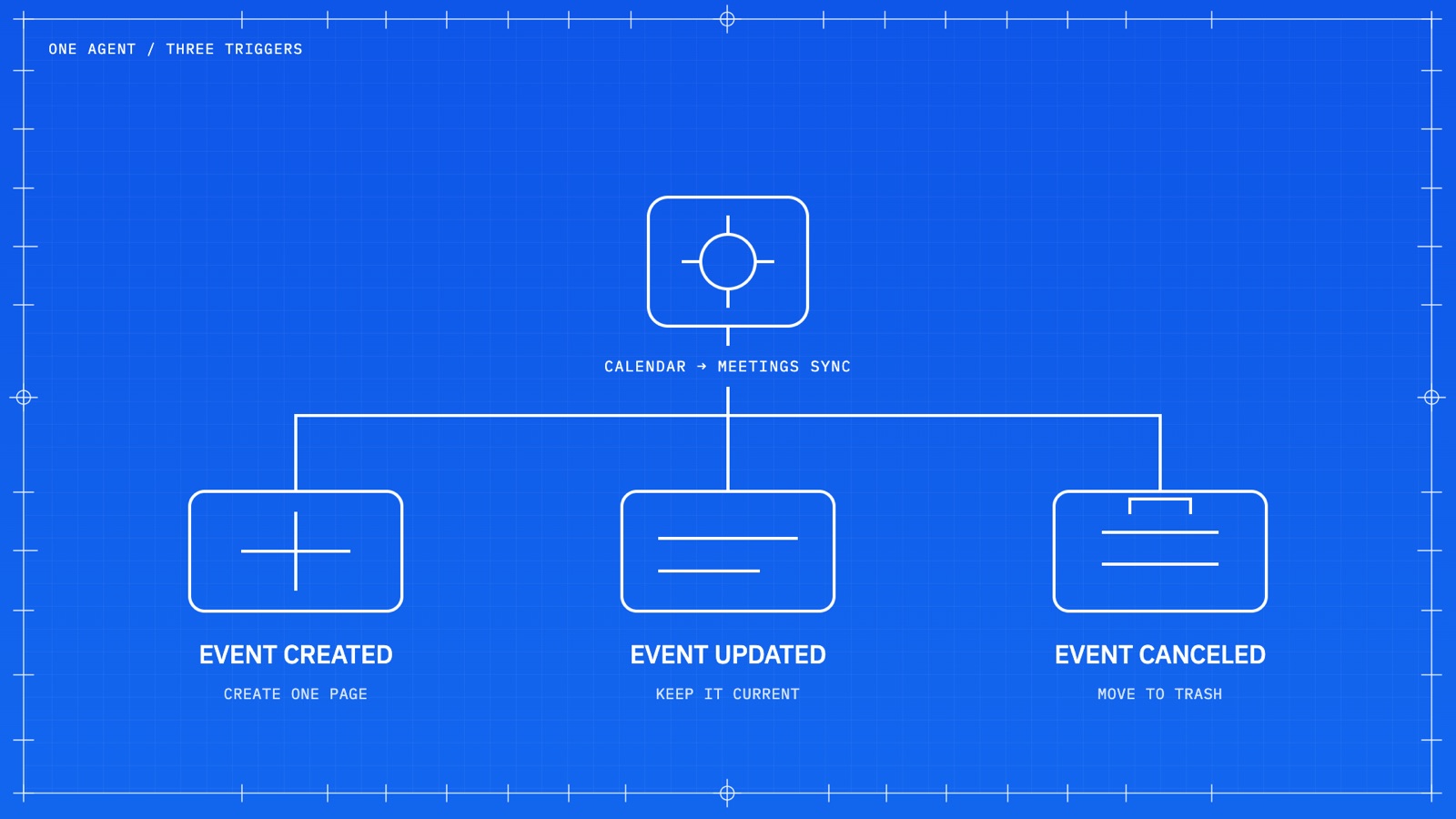
Notion writes the instructions and — this is the useful part — sets up the triggers for you. You should end up with three: Event created, Event updated, and Event cancelled. Those are the three states calendar-connected agents support.
Resist the urge to split these into three agents. All three depend on the same event identity, the same schema, and the same filter rules. Split them and those rules drift apart within a month — you'll fix a filter in one agent and forget the other two.
Only syncing on created is the most common mistake. Meetings move. People get added. Calls get killed. If your database only knows about the moment an event was born, it's wrong by Wednesday.
Match on the calendar event ID, never the title
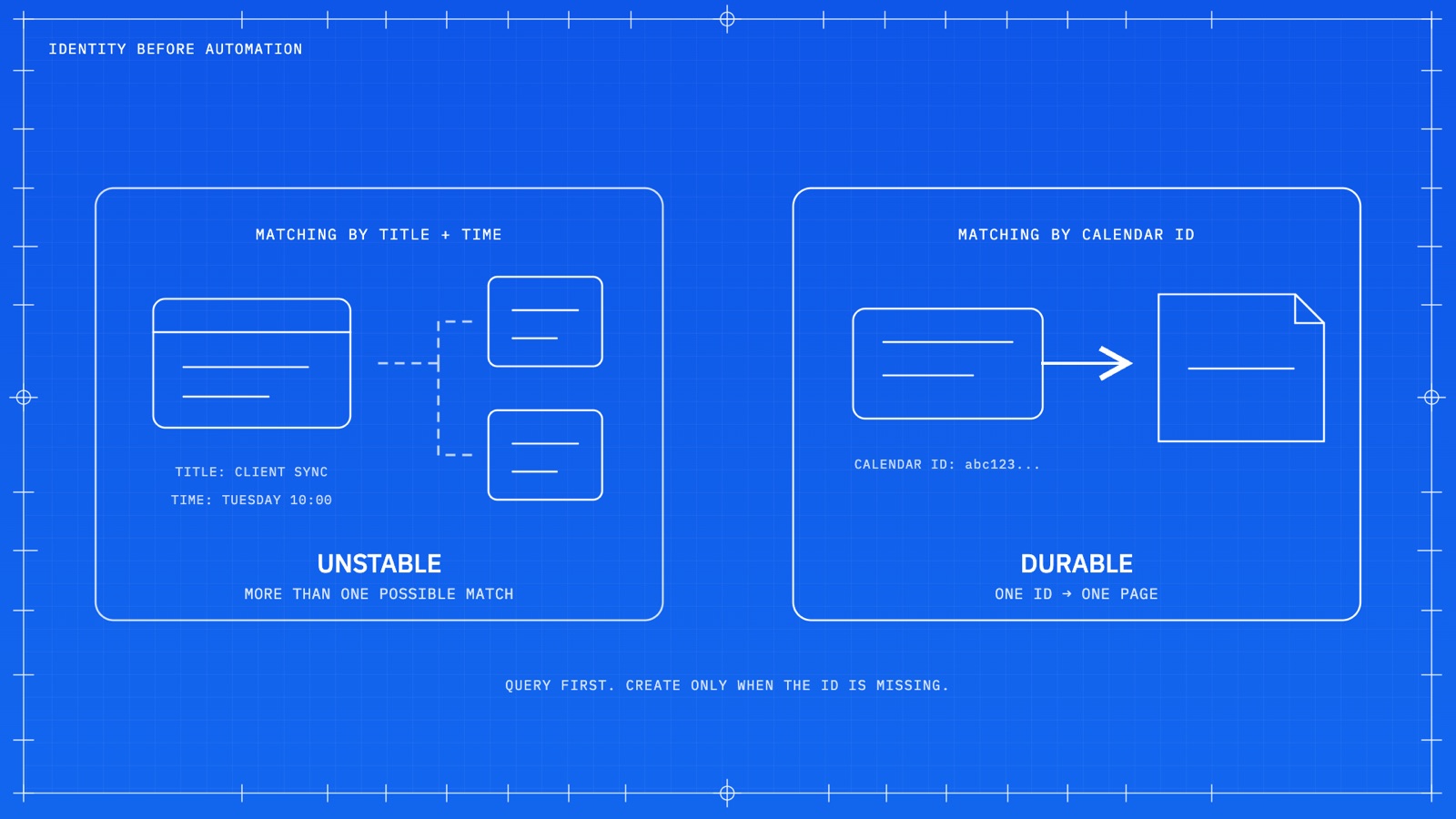
I got this wrong in my first version. The agent matched events to pages using the event name plus the date and time, which seems reasonable right up until it isn't.
Recurring meetings break it immediately — every instance shares a title. Rescheduled events break it too, because the time you're matching on is the thing that changed. You end up with duplicates, orphaned pages, or an update that lands on the wrong week's page.
Every calendar event has its own unique ID. Store it on the Notion page and match on that. The rule for the agent is: query the Meetings database by Calendar ID first, and only create a page when there's no match. If a page already exists, update it and stop.
Filter out everything that isn't a meeting
I block time for focus work and a weekly review. I don't need a meeting page for either, and neither do you. Without filters, your Meetings database fills up with empty pages for events that were never conversations.
Add the rules explicitly. Mine come down to:
- Skip events named "offline," "weekly review," or whatever your personal time blocks are called.
- Skip events with no Zoom or Google Meet link.
- Skip events with no other attendees.
- Skip all-day events.
One more rule that's easy to add and pays off fast: have the agent check attendee emails against your workspace members, and add anyone who matches as an attendee on the meeting page. With page-level access, that person can see the pages they're tagged in without giving them the whole database. For client work where you're collaborating in a shared dashboard, that's exactly the behavior you want.
The template rule that breaks this for most people
This is the single most important detail in the whole setup, so I'm giving it its own section.
Your agent needs to create meeting pages from the template — the one containing the Notion AI meeting notes block. A page created without that template won't be recognized by Notion Calendar. You'll have done everything else right, and the button will still say Add meeting note.
Set the meeting notes template as the default template on the Meetings database, then tell the agent to apply it. And know the boundary here: the public Notion API treats meeting notes blocks as read-only. The template is what carries the block. No API call or local skill is going to create and bind that block for you.
Permissions, model, and cost
In Tools and Access, keep it tight. This agent doesn't need web access. It doesn't need any database other than Meetings — unless you're also connecting meetings to projects or clients, in which case add those specific databases and nothing more.
Set the Meetings access to Can edit content. That lets the agent update properties without making structural changes to the database. This is advice I give clients constantly: when you're rolling databases out to a whole organization, default everyone to Can edit content and reserve Can edit or Full access for a couple of admins. People delete properties by accident far more often than you'd expect.
On the model: this is a deterministic job. Read fields from an event, write fields to a page. There's no real reasoning happening. Pick the cheapest model available and set a backup model so a single provider hiccup doesn't silently drop a meeting.
One thing worth checking on the sharing side: anyone who can interact with a calendar-connected agent may be able to reach data from the connected calendar. Keep the access list short, and don't publish a live connection.
Write the page link back to the event
I forgot this on my first pass and it's the step that makes the whole thing click. Once the meeting page exists, the agent has to grab that page URL and add it to the calendar event description.
Two rules matter here. First, append — don't overwrite. Plenty of event descriptions already contain a dial-in, an agenda, or a note from whoever scheduled it. Second, add loop prevention: if the only change to an event is the same Notion link the agent just wrote, it should exit without touching Notion. Otherwise the agent triggers itself, forever.
Test it in this order
Create a real test event with a conferencing link and one attendee, then verify in sequence:
- The agent run shows up in Activity.
- Exactly one page appears in the Meetings database.
- The page has the right Calendar ID and time.
- The template applied and the AI meeting notes block is on the page.
- The Notion page URL is in the calendar event description.
- After a reload, the event shows Open meeting note.
- Change the event title or time — the same page updates instead of a new one appearing.
- Cancel a second test event — the matching page moves to trash.
Test recurring meetings separately before you trust this with a real series. And get consent before you transcribe anything; recording laws vary by location and Notion recommends asking all participants when you're unsure.
Custom Agent or portable skill?
You can run this same workflow as a Claude Code or Codex skill instead of a Notion Custom Agent. The logic is identical — same triggers, same ID matching, same filters.
The difference is what runs it. A skill is an on-demand instruction set. A Custom Agent is autonomous and trigger-based. If you want this running in the background without you thinking about it, the Custom Agent is the right home.
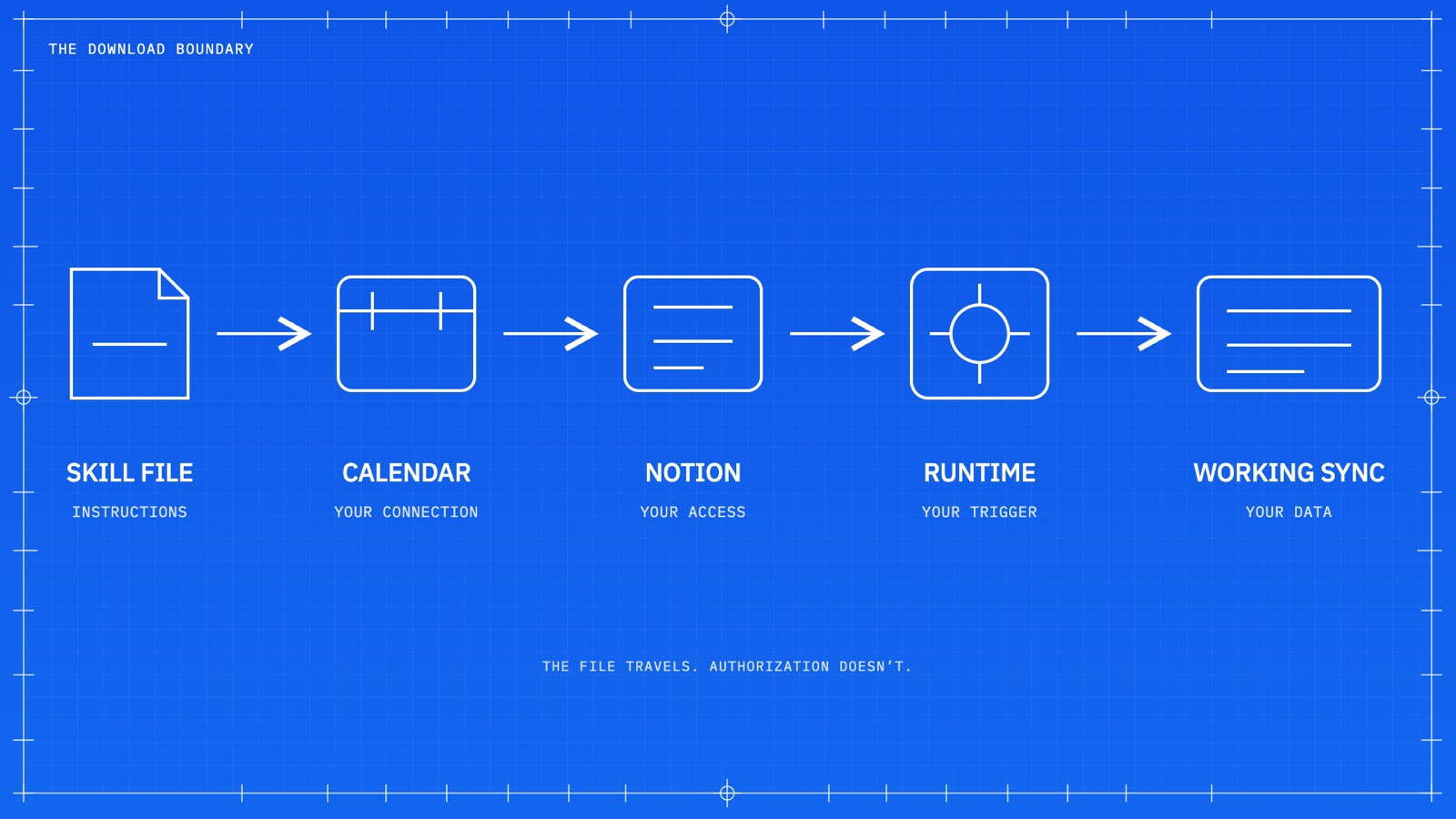
And an important boundary if you share either one: the file travels, the authorization doesn't. Whoever installs your skill or duplicates your agent still needs their own calendar connection, their own database mapping, their own triggers, and their own permissions. Nobody inherits your access.
FAQ
Why does Notion Calendar create a second meeting note?
It used to create a new page every time you clicked Join and transcribe, even when a Notion meeting page was already linked in the event. Notion updated that behavior. An event with a linked, recognized meeting page now shows Open meeting note instead.
Does Notion Calendar sync calendar events into a Notion database automatically?
No. Notion Calendar can display a Notion database that has a date property, but it doesn't turn Google or iCloud events into database pages. You need a Custom Agent or another automation layer for that.
Should I match calendar events to Notion pages by title and date?
No. Titles get renamed and times get moved, especially on recurring meetings. Store the calendar event ID on the Notion page and match on that instead.
Do I need one agent per trigger?
No. Use one agent with all three triggers. They share the same event identity, schema, and filter rules, so splitting them just guarantees those rules drift apart.
Does sharing a skill share my calendar access?
No. The skill file carries instructions only. Whoever installs it needs their own authorized Notion and calendar connection and their own runtime to execute the sync.
The Workcraft take
Meetings are usually the best place to start when a team is moving into Notion. It's a low-stakes, high-frequency workflow that everybody already understands, and it becomes the foundation for the more interesting work — agents that pull tasks out of notes, synthesize decisions across a week of calls, and keep departments current without a status meeting about the status meetings.
But none of that survives a database where half the meetings have two pages. Identity comes before automation. Get one durable record per event, keep it current through updates and cancellations, and make the calendar open that record instead of guessing. Then build on top of it.
If you built this and it broke somewhere, I'd genuinely like to know where — that's usually the setup step nobody documented.